Managing child profiles
A child profile records a child (first name, last name, date of birth) linked to a parent. It lets a parent manage their child's participation in the club's events and call-ups.
Who can manage child profiles?
- The president and the manager can create, update and delete the club's child profiles.
- A member flagged as a "parent" can view their own children and respond on their behalf, but cannot create or edit a profile.
List and editing
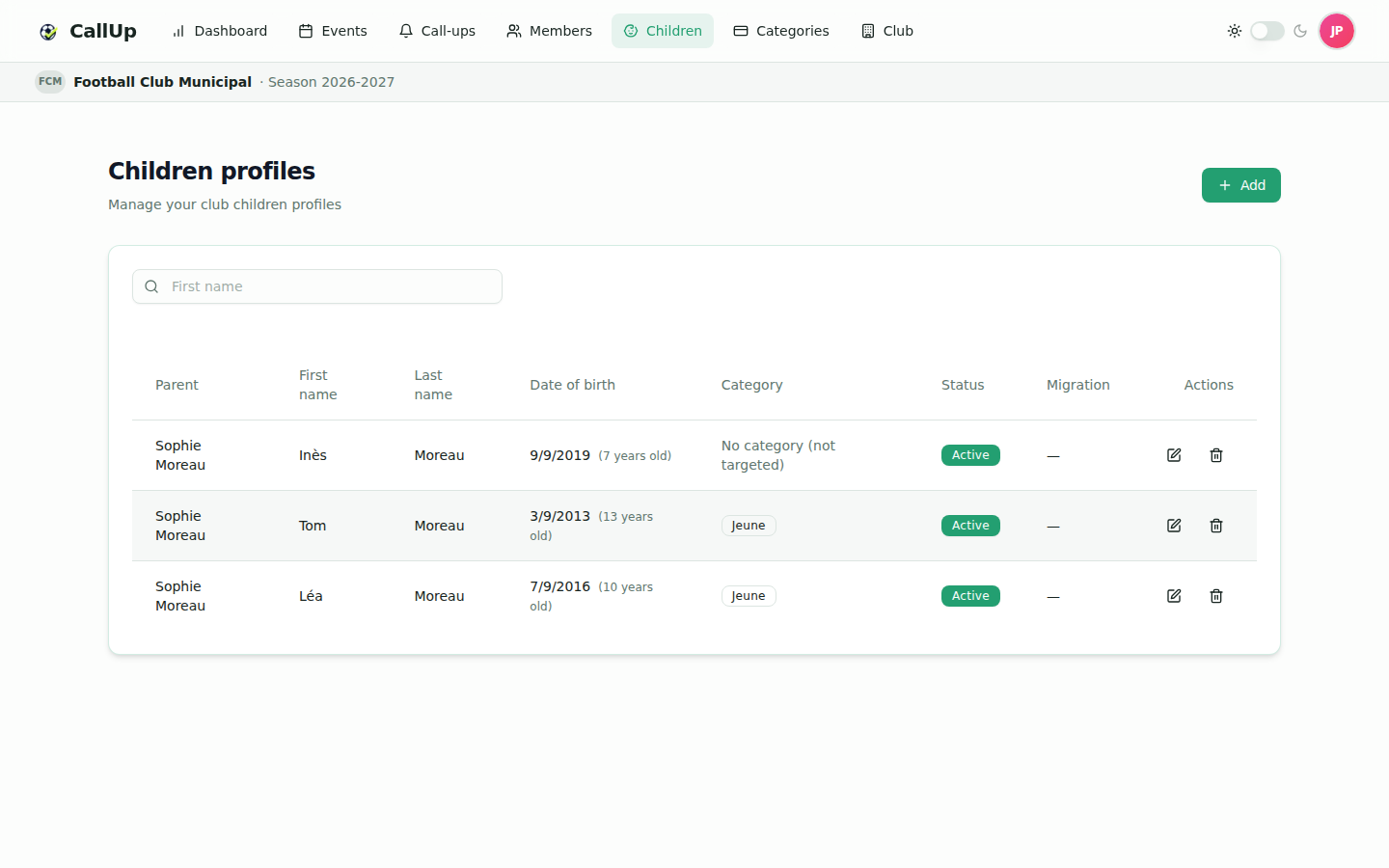
The list shows the club's children with their category when set. The president and the manager have an Edit button on each row to update the first name, last name, date of birth, category and notes (500 characters maximum). A search box helps you find a child. Below large screens (phones and tablets), profiles are shown as cards.
Creating a child profile
Restricted to the president and the manager.
- Open the "Children" module.
- Click "Add".
- Enter the child's first name, last name and date of birth.
- Select the parent: the list proposes members flagged as "parent".
- Optionally assign a member category.
- Optionally add notes (500 characters maximum).
- Save the profile.
The child must be 15 years old or younger at the time the profile is created.
:::note Production On the production environment, creating a child profile is refused once the subscription's capacity is reached: child profiles count as billable members. :::
Creating a non-member parent from the child profile
If no member is flagged as a "parent" yet, the form says so and offers to open members to turn on the "Parent" status, or to create a non-member parent directly for this child. Enter the parent's first name, last name and email: a parent account attached to the club is created together with the child profile, and the parent receives a welcome email with their credentials.
Linking a parent
A child profile's parent is either a member flagged as "Parent" or a non-member parent created from the child form (see above). A member is flagged as a parent when they are added, or later from their edit page, with the "Parent" switch: "Allow this member to be linked as a parent of a child in the club". Any member (President, Manager or Player) can be flagged as a parent.
Inviting a non-member parent
The president and the manager can also create a parent who is not a club member directly from the child profile form (see above). The parent gets an account attached to the club and a welcome email with credentials; they can then be linked to their child's profile. Their access is the same as a member parent: read their own children, answer present/absent and receive notifications. A parent can only be linked to children of the same club.
Assigning a category
A member category can be assigned to the child (optional). It must belong to the same club. As for an adult member, the category determines the child's eligibility for events.
Deleting a child profile
Restricted to the president and the manager.
Deleting a child profile is an irreversible anonymization: the child's data is permanently removed. Use this action carefully.
The parent's point of view
A member flagged as a "parent" sees their own children in the "Children" module (read-only, without an add button).
- Scope tabs: on the Events, Call-ups and dashboard pages, the parent has a "Me" tab (if they are also a member) and one tab per child, labelled with the child's full name. Picking a child's tab shows that child's dashboard (see Understanding the Dashboard).
- Responding for a child: the parent can respond present or absent for their child.
- Notifications: the parent is notified "on behalf of their child" (prefix "For Léa — ...") for events and call-ups affecting the child.
Migration to a player account (digital majority)
From age 15, a child reaches "digital majority": they can migrate from a child profile managed by their parent to an autonomous player account, with their own login credentials. The child's history (event participations, call-ups, category) is preserved and transferred to the new account.
1. Parent notification
As soon as the child turns 15, the "Request migration" button appears on their row in the "Children" module, on the parent's side. A president or a manager who is also the child's parent sees this button on their own child's row; on the club's other children's profiles, they see the "Digital majority reached" badge. The parent also receives a push notification informing them that their child can now migrate to a player account.
This notification is sent the next time the parent opens the "Children" page after the child's birthday (there is no daily background check).
2. Migration request (parent)
On the eligible child's row, the parent clicks "Request migration" and enters an email address. This address will become the login for the future player account — the child has no email of their own while linked to a child profile.
The request sends a push notification to every president and manager of the club, and the child's row shows a "Request sent" badge on the parent's side.
3. Approval or rejection (president, manager)
On the relevant child's row, the president or the manager sees two buttons appear:
- Approve migration: creates the player account with the email provided by the parent and an automatically generated password, sent by email to the new player. The child's category (if any) and their full history (participations, call-ups) are transferred to this new account.
- Reject: declines the request; the parent is notified and can submit a new request later.
4. After migration
Once the migration is approved:
- The child profile remains visible in the module, with a "Player account created" badge — it is not deleted, to preserve history and GDPR traceability.
- The new user appears as an autonomous player, with the "Player" role.
Non-member parent account deactivation
If the parent was an invited parent account (created solely to manage their children, without otherwise being a club member) and all of their children have been migrated, their account is automatically deactivated — it no longer serves a purpose and the parent can no longer log in. The parent receives an email informing them of this deactivation, listing the children concerned.
A club member flagged as a "parent" (president, manager, or player who also happens to be a parent) is never deactivated automatically: only an account created solely to hold children is affected.